

How To Reset Windows 7 Password With Command Prompt
Reset Windows 7 Login Password Using Command Prompt
Forgot Windows vii admin password and there is no other user business relationship to login? The best matter you can do to regain access is using a password reset disk, merely most of users don't know the feature existed or yous never though you'd actually forget your PC countersign. Luckily at that place are several Control Prompt tricks that can assist you reset forgotten Windows seven login password hands.
Method 1: Reset Password with Command Prompt in Windows seven
If there are other authoritative accounts bachelor on your computer, you lot can log on to Windows seven and easily reset your forgotten user password using Command Prompt:
-
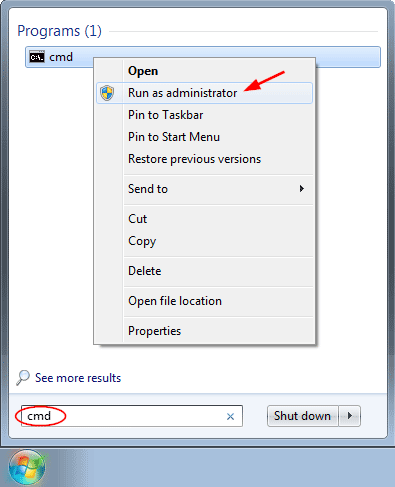
Click Start and then type "cmd" in the Search box. Right-click on the upshot and select Run as administrator.
-
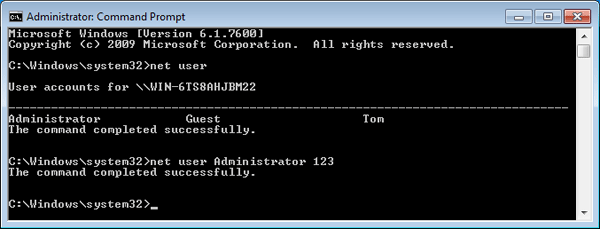
When the Administrative Command Prompt opens, run the following control to reset lost user password. Substitute username for your business relationship's proper name, and new_password for your new countersign.
net user username new_password
Method 2: Reset Password with Command Prompt in Safe Way
Windows seven and earlier versions have a built-in hidden Administrator account which has no password by default. After forgetting the password to your regular account, you can admission the built-in Administrator account in Prophylactic Mode, and then reset your forgotten password with Command Prompt.
-
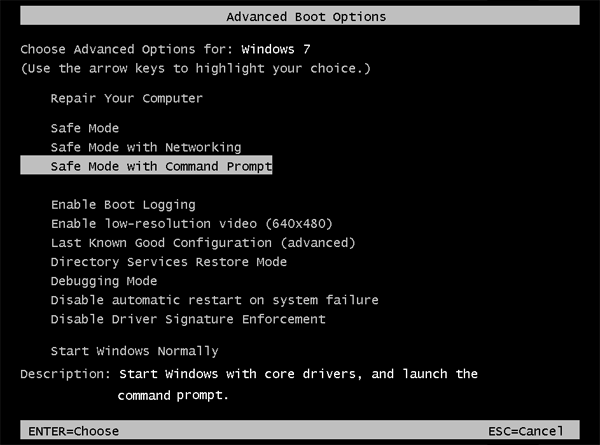
While starting the estimator, concord downwards the F8 key until the Advanced Boot Options screen appears. Using the arrow keys to select "Prophylactic Manner with Command Prompt" and press Enter.
- You will see the subconscious Administrator account available on the login screen. One time logging in, the arrangement will automatically launch the Command Prompt with admin rights.
-
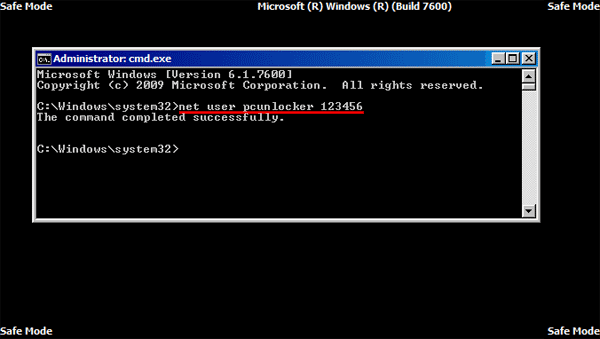
Run the following command and you lot can reset forgotten Windows 7 password in no time.
net user username new_password
Notation that this method doesn't piece of work if the hidden Administrator account is disabled.
Method 3: Reset Windows 7 Countersign Using the Utilman.exe Trick
This trick based on the substitution of the Utility Director (Utilman.exe) program that can exist used during logon screen with Command Prompt (cmd.exe), so you can admission Command Prompt from the login screen and reset your Windows vii password speedily. Follow these steps:
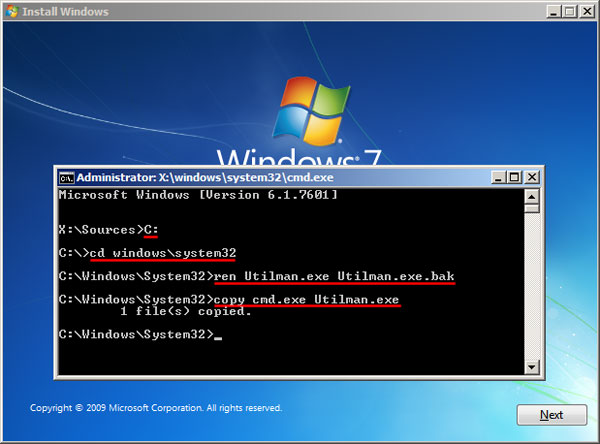
- Boot your computer from Windows 7 installation disk. When the Install Windows screen appears, press SHIFT + F10 keys to open the Command Prompt.
-
Type in the following commands. Supersede C: with the drive where your Windows seven system was installed.
C: cd windows\system32 ren Utilman.exe Utilman.exe.bak copy cmd.exe Utilman.exe
-
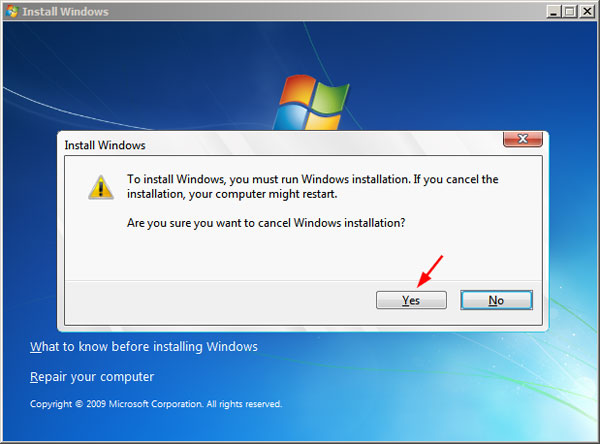
That's all we need to practice hither. Close the Command Prompt and the Install Windows dialog to restart y'all estimator.
-
Let the Windows 7 boots normally this time. At login screen click the Ease of Access icon, it will launch the Command Prompt window. You tin can then run the post-obit command to reset your forgotten password.
internet user username new_password
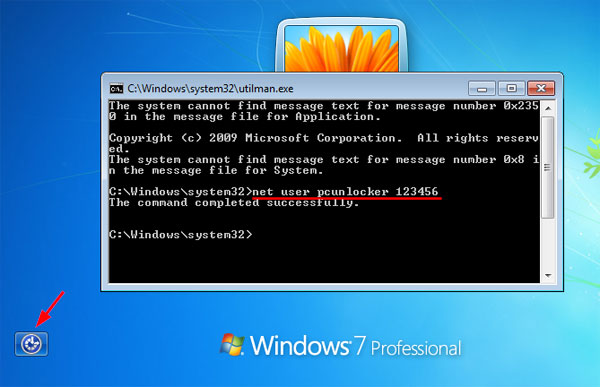
- Close the Control Prompt and yous tin use the new password to log in. Don't forget to restore the original Utilman.exe file back.
If you're nonetheless unable to reset Windows 7 password with Command Prompt or you have no prior knowledge of the Control Prompt, yous can try a powerful do-it-yourself tool - PCUnlocker, which makes password recovery easier than y'all recall.
Related Articles

Source: https://www.top-password.com/knowledge/reset-windows-7-password-with-command-prompt.html
Posted by: garciafonly1976.blogspot.com
0 Response to "How To Reset Windows 7 Password With Command Prompt"
Post a Comment